Most beginners blame ChatGPT too quickly.
The answer feels vague. The writing sounds repetitive. Sometimes the response completely misses the point.
After a few frustrating attempts, many people start assuming the AI simply is not as smart as everyone online claims.
That reaction makes sense initially.
Still, the problem usually starts somewhere else.
Prompt quality.
Funny enough, small prompt changes often create dramatically different results. A single extra sentence can completely shift how useful the response becomes.
Quick Overview:
- Most weak AI outputs begin with weak prompts.
- Clear instructions improve response quality significantly.
- Specific context reduces vague answers.
- Follow-up prompts matter more than beginners expect.
- Good prompting is a process, not a single message.
Most Beginners Prompt ChatGPT Like Google Search
This happens constantly.
People open ChatGPT and type things like:
- “Best business ideas”
- “Explain marketing”
- “Write article”
- “Best AI tools”
Technically, the prompts work.
The problem is that broad prompts force the model to guess what the user actually wants.
That guessing creates weak outputs surprisingly often.
One person wants beginner-friendly advice. Another expects expert-level detail. Someone else only needs a short summary.
The AI cannot reliably predict those expectations without clearer instructions.
Most bad AI responses are not random. They usually come from unclear direction.
Why Context Changes Everything
Most beginners underestimate how important context really is.
Adding even small details helps guide the model toward more useful answers.
Compare these examples.
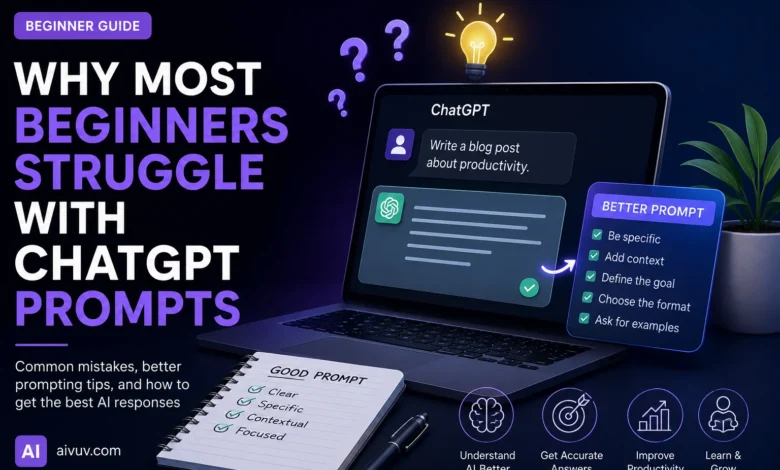
Weak Prompt:
“Explain SEO.”
Improved Prompt:
“Explain SEO to a beginner launching a small AI blog. Focus on practical steps instead of technical jargon.”
The second version immediately creates stronger boundaries:
- Audience
- Topic focus
- Complexity level
- Writing style
- Practical intent
That sounds minor at first.
In practice, it changes output quality dramatically.
Most People Stop After the First Prompt
This is another huge mistake.
Beginners often treat the first response as final.
Experienced users rarely do that.
Instead, they continue refining the conversation:
- Clarify weak sections
- Add examples
- Simplify explanations
- Expand important details
- Change tone or structure
Good prompting behaves more like collaboration than one-time searching.
Honestly, the second or third response is often where things start getting genuinely useful.
Why Overloading Prompts Creates Worse Results
Some users go in the opposite direction.
Instead of vague prompts, they suddenly ask for everything at once:
- Research
- SEO
- Marketing strategy
- Predictions
- Writing
- Business analysis
All inside one message.
The result usually becomes shallow because the request itself lacks focus.
Breaking larger tasks into smaller stages almost always improves quality.
ChatGPT Still Needs Human Judgment
This point matters more now than ever.
Many beginners quietly assume AI outputs are automatically accurate because the writing sounds confident.
That assumption creates problems.
ChatGPT can still:
- Generate incorrect information
- Misunderstand context
- Invent references
- Oversimplify topics
- Miss important nuance
Smooth writing can hide weak information surprisingly well.
Clear wording does not automatically guarantee accurate information.
The Best Prompts Usually Feel Surprisingly Simple
Most beginners imagine expert prompting as something highly technical.
Usually, strong prompts are just structured clearly.
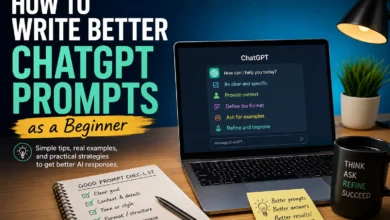
They explain:
- Who the audience is
- What the goal is
- What style is needed
- How detailed the answer should be
- What should be avoided
That structure reduces confusion for both sides of the interaction.
Why Prompting Improves With Practice
Prompting is partly a communication skill.
People improve once they start noticing patterns:
- What creates vague answers
- What improves specificity
- What causes repetition
- What produces clearer structure
Over time, users naturally learn how small wording changes influence outputs.
That learning curve feels surprisingly fast after enough experimentation.
Most Productivity Gains Come From Simplicity
This applies to prompting too.
Many beginners overcomplicate workflows immediately:
- Huge prompts
- Complex templates
- Massive instructions
- Endless formatting rules
Sometimes simpler prompts work better because they reduce unnecessary friction.
The strongest workflows usually stay focused and lightweight.
Prompting Works Better When Goals Stay Clear
One thing experienced users do consistently is define the outcome before writing the prompt itself.
That sounds obvious.
Most people skip it anyway.
Without a clear goal, prompts drift toward randomness:
- Too broad
- Too generic
- Too unfocused
- Too repetitive
Clear goals produce cleaner interactions.
What Makes a Prompt Actually Effective?
After testing AI tools for months, one pattern becomes difficult to ignore.
The best prompts usually combine:
- Clear context
- Specific intent
- Reasonable constraints
- Simple language
- Follow-up refinement
That combination consistently produces stronger outputs than overly clever prompting tricks.
Useful Resources
Final Thoughts
Most beginners struggle with ChatGPT prompts because they expect the system to automatically understand vague requests.
Usually, stronger results come from clearer communication instead.
Good prompts do not need to sound complicated.
They just need structure.
Clear goals. Useful context. Simple instructions. Follow-up refinement.
Funny enough, prompting becomes much easier once people stop chasing “perfect prompts” and start treating the process more like an ongoing conversation.
That shift alone improves results more than most beginners expect.
Frequently Asked Questions
Why are my ChatGPT prompts giving weak answers?
Most weak outputs come from vague or overly broad prompts that lack enough context or direction.
Do longer prompts always work better?
No. Clear and focused prompts usually perform better than extremely long complicated instructions.
Should beginners use follow-up prompts?
Absolutely. Follow-up prompts often improve clarity, depth, and usefulness significantly.
Can ChatGPT understand unclear requests?
Sometimes, but unclear prompts force the AI to guess user intent, which increases weak or inaccurate outputs.
What makes a good ChatGPT prompt?
Good prompts usually include clear goals, audience context, simple instructions, and reasonable constraints.