Most AI productivity workflows start with good intentions.
Someone wants better organization, faster writing, cleaner notes, or less repetitive work.
At first, AI tools seem like the perfect solution.
Then something strange happens.
The workflow slowly becomes more complicated than the original problem itself.
New dashboards appear. Notifications multiply. Automations expand everywhere. Five different apps suddenly manage tasks that once required only a notebook and basic focus.
Funny enough, many people eventually spend more time managing productivity systems than doing meaningful work.
That pattern appears constantly in modern AI productivity culture.
The strongest workflows usually stay much simpler than beginners expect.
Quick Overview:
- Simple AI workflows usually outperform complicated systems.
- Too many tools create unnecessary friction.
- AI works best for repetitive and organizational tasks.
- Human review still matters enormously.
- Sustainable productivity depends on clarity, not endless automation.
Why Most AI Workflows Become Overcomplicated
The AI industry constantly promotes optimization.
Every new app promises:
- Smarter organization
- Automatic summaries
- Faster workflows
- Perfect productivity
- Complete automation
Those promises sound exciting initially.
The problem appears when users stack too many systems together simultaneously.
One app handles notes.
Another manages meetings.
A third organizes tasks.
Then multiple AI assistants join the workflow on top of everything else.
Eventually, maintaining the system becomes its own form of work.
A productivity workflow should reduce friction, not create new layers of maintenance.
What Makes a Good AI Workflow?
The best workflows usually share several characteristics:
- Simple structure
- Clear goals
- Minimal switching between apps
- Lightweight organization
- Manual review when needed
Good workflows support focus rather than interrupting it constantly.
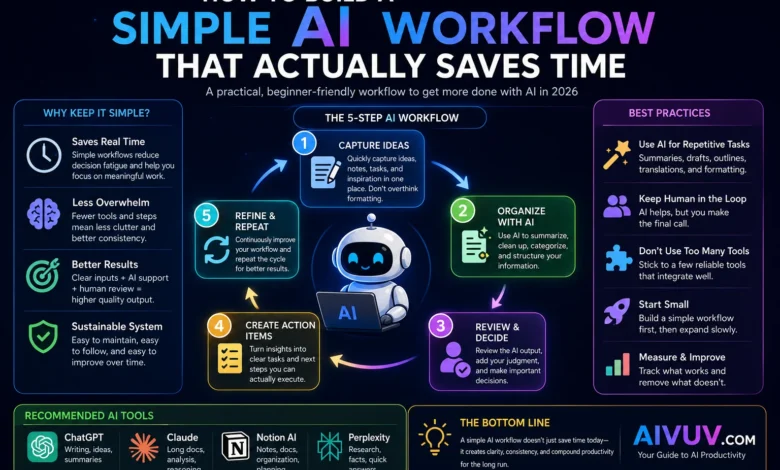
Step 1: Capture Information Quickly
Most productive systems begin with fast idea capture.
That includes:
- Notes
- Tasks
- Research ideas
- Meeting points
- Draft concepts
The goal is simplicity.
Do not overthink formatting immediately.
Many people waste enormous amounts of time trying to build “perfect organization” before collecting useful information consistently.
Simple capture systems usually survive longer.
Step 2: Use AI for Organization and Summaries
This is where AI becomes genuinely useful.
AI handles repetitive organization tasks surprisingly well.
Examples include:
- Summarizing notes
- Cleaning rough drafts
- Organizing task lists
- Extracting action items
- Condensing meetings
These small improvements save time without dramatically increasing workflow complexity.
Step 3: Keep Important Decisions Human
This step matters more than many beginners realize.
AI can assist organization and drafting effectively.
It still struggles with:
- Priority judgment
- Long-term planning
- Context awareness
- Human nuance
- Strategic decisions
The strongest workflows combine automation with human review rather than replacing thinking entirely.
Simple Beginner Workflow Example:
- Capture rough notes quickly.
- Use AI to summarize and organize.
- Review important information manually.
- Create clear action items.
- Ignore unnecessary automation.
Step 4: Avoid Too Many AI Tools
This mistake appears constantly.
Beginners often install:
- AI writing apps
- Research assistants
- Task managers
- Automation systems
- AI note-taking tools
- Scheduling platforms
Eventually, the workflow becomes fragmented across multiple dashboards.
The irony becomes difficult to miss.
Tools designed to improve productivity start creating cognitive overload instead.
Most experienced users eventually simplify their setups dramatically.
Step 5: Build Sustainable Habits
AI alone does not create productivity automatically.
Technology usually amplifies existing habits rather than replacing them.
Someone already organized may become slightly more efficient with AI support.
Someone constantly distracted often becomes distracted across even more sophisticated systems.
Sustainable workflows still depend heavily on:
- Focus
- Consistency
- Clear priorities
- Reasonable expectations
Why Lightweight Workflows Usually Last Longer
Many people assume advanced automation creates the best results.
Funny enough, lightweight systems usually survive longer because they require less maintenance.
Simple systems create:
- Less friction
- Fewer distractions
- Lower cognitive load
- Better consistency
That balance matters enormously over time.
Useful AI Workflow Tools
| Tool | Main Use | Best For |
|---|---|---|
| ChatGPT | Writing & summaries | General productivity |
| Claude | Long documents | Research workflows |
| Notion AI | Organization | Notes & planning |
| Perplexity AI | Research support | Quick information gathering |
Useful Resources
Final Thoughts
The best AI workflows rarely look complicated.
Most sustainable systems focus on:
- Simple organization
- Clear priorities
- Light automation
- Human review
- Consistent habits
Funny enough, many experienced users eventually remove complexity after spending months experimenting with advanced productivity systems.
Not because AI lacks value.
Because attention remains limited no matter how advanced the tools become.
Good workflows support focus instead of constantly competing for it.
Frequently Asked Questions
What is a simple AI workflow?
A simple AI workflow uses lightweight tools and automation to organize information, summarize tasks, and reduce repetitive work without creating unnecessary complexity.
Do AI workflows actually save time?
Yes, especially for repetitive organization and drafting tasks when workflows remain simple and focused.
Why do complicated productivity systems fail?
Many systems create excessive maintenance, distractions, and cognitive overload instead of improving focus.
What AI tools work best for productivity?
Popular tools include ChatGPT, Claude, Notion AI, and Perplexity AI depending on workflow needs.
Should beginners automate everything?
Usually not. Simple systems with selective automation tend to work better long term.